Why Try an AI PC Builder?
Building a PC used to mean hours spread across forums, spec sheets, benchmark charts, and compatibility lists. An AI PC builder promises to collapse all of that into a short conversation: tell it what you want, get a build back. That's a genuinely useful shortcut, and it's why more people are starting with one.
But there's a question worth asking before you trust any of them with your money: does the tool actually know your parts fit together, or is it just guessing well?
What is an AI PC builder?
An AI PC builder is a tool that takes what you want out of a computer - the games you play, your budget, the work you do - and turns it into a list of parts, without you needing to know the difference between DDR4 and DDR5 or which chipset supports which CPU. Instead of you researching every component, the tool does the selecting.
The best ones save you the two things that make PC building intimidating: knowing where to start, and knowing whether your choices actually work together.
What are they genuinely good at?
Used well, an AI PC builder is a real time-saver:
- Translating plain language into parts. You describe the goal ("a quiet machine for video editing under $1,500"), and it turns that into a starting build. No jargon required.
- Surfacing options you didn't know about. There are hundreds of viable parts at any budget. A good tool narrows that down to a handful that fit your case.
- Giving you a budget-anchored starting point. Rather than pricing parts one at a time and blowing past your limit, you get a complete build that already fits the number you gave it.
For anyone building their first PC - or their fifteenth, but short on time - that's a strong reason to start with one.
So where do most AI PC builders fall short?
Here's the catch, and it matters. Most tools that advertise "AI" are a chat prompt sitting on top of a language model. Those models are very good at suggesting parts, because they've read a lot about PCs. But they predict text - they don't verify hardware.
That means an AI chat builder will, with total confidence, hand you a build where the CPU cooler is too tall for the case, the graphics card overhangs a slot you needed, or the motherboard doesn't have enough PCIe lanes to run everything at full speed. Nothing in it actually checked - it produced the most likely-sounding answer, which isn't the same as a correct one. These are exactly the problems you don't discover until the parts arrive and something doesn't fit or won't post.
Here's a real case. On the MSI MAG B550 Tomahawk Max WiFi, the second full-length PCIe x16 slot runs at x4, because it's wired to the chipset rather than the CPU. Install an NVMe drive in the second M.2 slot and that PCIe slot is disabled entirely. Not slowed down, off. If you planned to put a capture card or a 10GbE network card there, it isn't there anymore. Nothing in that build is incompatible: every part fits, every socket matches, and a parts list will pass it without comment.
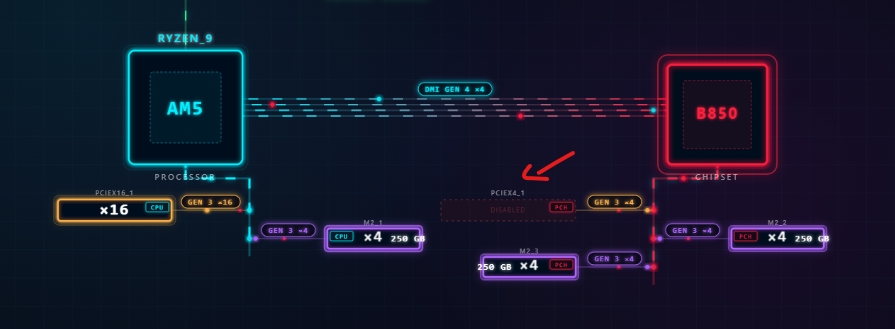
The second full-length PCIe slot on the B550 Tomahawk, before and after populating the second M.2 slot.
What should you look for in one you can trust?
The line that separates a helpful tool from a risky one is simple: does it compute compatibility, or just predict it?
A tool you can trust should:
- Verify physical fit - graphics card length against your case, cooler height, whether one card blocks the slot next to it.
- Check the electrical side - power supply headroom, connector types, memory speeds your board actually supports.
- Understand the board's PCIe lane topology - how many lanes reach each slot and at what speed, so nothing silently runs at half its capability.
- Score the build for what you'll actually do - a gaming build and a content-creation build shouldn't value the same parts.
- Give realistic performance targets, not best-case numbers - estimates with a buffer built in, so a "120 FPS" claim still holds with Discord and background apps running.
If a tool does those things, the AI's suggestions come with a guarantee that the parts work together. If it doesn't, you're trusting a confident guess.
How RigSync approaches it
This is the gap I built RigSync to close. RigSync is a PC-building web app that optimizes a complete build for your use case and budget - reaching the performance that matters while staying under budget - then computes that it actually works, down to PCIe lane topology and whether a card physically blocks the slot next to it, shown in an interactive visualizer, whether that's gaming, content creation, or a professional workstation.
The optimizer builds the whole thing for you; then every choice runs through the compatibility engine and the interactive topology visualizer. Nothing in that path is a language model guessing at parts. The optimizer searches for the best combination your budget allows, and every candidate is checked for physical fit, power, and the lanes each slot needs. Performance predictions come from real-world benchmark data with a conservative buffer, so they're realistic targets rather than best-case marketing numbers.
And there isn't one rigid path. If you think in terms of games, the Game-Based Builder builds around the titles and resolution you want. If you think in terms of budget and purpose, the Custom Builder optimizes every dollar for your use case. If you'd rather pick parts yourself, the Component Browser checks compatibility as you go.
Should you try one?
Yes - an AI PC builder can save you hours and take the intimidation out of the process. Just pick one that verifies the build instead of guessing at it. The suggestions are the easy part; the compatibility is where it counts.
Want to see the difference? Start building your PC with RigSync - pick some games or a use case, set a budget, and watch it check every part as it goes.
Comments (0)
No comments yet. Be the first to share your thoughts!